[xplorer²] — free* version
home » lite version


"Don't knock my little brother" — a big brother

Ultimately affordable file management power

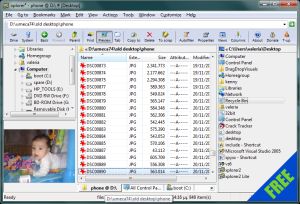
manage and preview files in a familiar & customizable explorer interface; portable and free version

The lightweight version of xplorer² is not as powerful as the professional version but it shares the same desktop browsing and file management engine, it sports dual panes and folder tabs, and gives many rival paid-for file managers a run for their money — literally! It is a complete little file manager, albeit lacking a bit in bells and whistles.

You will find the missing features in a table further down. In summary it suffers a bit in terms of customization and it won't offer you the scrap containers — so you can't use the powerful search command. Other than that it is the real deal and please don't knock it till you tried it!

Technically speaking this free version is unsupported, but you can post your issues and questions in the appropriate forum and assistance will come your way.

For all private and academic users

The free version is for private (home) or academic (school & university) use only. You cannot use it in any commercial context, including but not limited to: corporate, office, military, government etc. All commercial users must obtain a licence for the full version.

Latest version: 1.7.0.5 [27.Sep.2007] (1 MB)

download free x2
* private or academic use only


Feature comparison table

This table compares windows explorer (win), the old 2xExplorer (2x) and the lite and professional versions of xplorer². Click on symbols to see a video demonstrating how each feature in the professional version can help your daily tasks.

Featurewin2x
lite

pro
All-area shell namespace access
Shell integrated with drag/drop, context menu etc
Automatic sensing of changes in all folders (networked etc) —
Multithreaded & multi-window operation —
Folder tree panel
Dual pane mode (browse 2 folders in one window) —
Tabbed interface — —
Save and restore tabs (folder groups) — — —
Keyboard shortcuts and overall usability —
Path autocompletion —
Filtering of item visibility —
Filtering on arbitrary criteria (hyperfilters) — — —demo: automatic type-based filters and free-form text filtering
Selection engine for precision marking of files —
Selection with arbitrary criteria (hyperfilters) — — —
Extended filesystem information columns (comments etc) —
Even more columns (checksum, 8.3 name etc) — —
Multi-column sort (using shift+column click) — — —
Individual folder settings — —demo: per-folder view settings
Window layout saving and management —
Export folder information as text (for printing etc) —
Hard links (NTFS) —
Mass renaming —
Change file dates (touch) — —
Find text in files —
Search for multiple keywords with boolean context — —
Search for text in office and PDF documents using filters — —
Search for text using regular expressions — — —
Customizable info bars (status bar for each pane) — — —
Unicode & file encoding aware — —
Unicode version available — —
Split/Merge/Shred —
Text/RTF/Hex preview —
Text editor —
Graphics & HTML preview
Thumbnail view mode —
Mini- and densely packed thumbnails — — —
Fuzzy filename matching — — —
Multimedia preview (audio & video) —
Find files with arbitrary criteria — — — demo: search for recently modified files that include some text, and preview the results
Search within archives, FTP, webfolders (webDAV) etc — — —
Refine previous search — — —
Scrap containers (simultaneously manage many folders) — — —
Folder comparison & synchronization —
Deep synchronization (including subfolders) — — —demo: compare two folder hierarchies using mirror browsing/scrolling and flat browsing mode
Script wizard for DOS & win32 text commands —
Intercept command output in user-friendly console — — —demo: use command line to launch windows and DOS programs
Customizable user command menu — — —
Detect duplicate files & cleanup — — —demo: examine subfolder size and locate duplicate files
Toolbar customization —
Add extra toolbars and custom button icons — — —demo: customize bookmarks and toolbar buttons
Drivebar for easy access to local drives — —
Detailed breakdown of subfolder disk usage (statistics) — —
Robust background file transfers with optional filters — — —demo: robust transfer for daily backup; pause and resume file copy
Exact preview of ActiveX documents (office, PDF etc) — — —demo: preview PDF documents in draft and full mode
Custom/skinned system icons (drives etc) — —
Show in groups — —
User defined groups — — —
Extended icon overlays (e.g. TortoiseSVN) —
Color coding of filenames — — —demo: color coding files according to their type or attributes
Folder junctions, symbolic links (NTFS) — —
Calculate folder sizes in detailed view — —
Bookmark and quicklaunch panel (mini-scrap/"drop box") — —demo: drop stack, drop zones
Keyboard (hotkey) customization — — —demo: customize keyboard shortcuts
Toolbar skinning — —
Sample reading speed for folder with 7000 items (sec)1.05 1.5 0.83 0.83
Program size (kB)237 596 581 793
Commands in the menu system48100145208

Why don't you try out the pro version? It's free for 21 days so you've got nothing to lose!
  Download xplorer2 pro


back to main page
  Do you want to check what the professional version has on top of xplorer² lite? Try it for free today and see what you're missing out!

Download xplorer2 pro  


name
e-mail

RSS Feed
© 2002—2008 Nikos Bozinis, all rights reserved

eXTReMe Tracker