©2002-2025 ZABKAT
 xplorer²
exponential growth in file management productivity




Home » Tour » Browse » Preview » Search » Manage » Synchronize » Console » Customize
■ Locate your documents with unparalleled precision
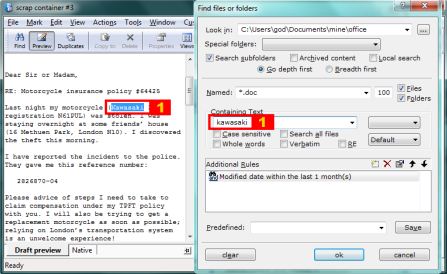
We are particularly proud of Omni-finder, the desktop search engine within xplorer². Not only will it search for the usual filenames, contained text etc, but it can use all pieces of file information xplorer² can show in its detailed view as search rules. You can search within file comments, picture data, ID3 tags, attributes, keywords, practically all shell column handlers supported by your windows OS. Filenames can be fuzzy and text searches support regular expressions.
You also control where to search, be it one folder or a set of disparate folders. If you have a lot of files you'll appreciate the increased precision these extra search conditions allow you.
You can search in all your office, PDF/WPD/ODT and other documents using desktop search text filters — and in plain text files regardless of their encoding (unicode/UTF-8 and local codepages)
The search results are shown in so called scrap containers, which act like virtual folders. The quickviewer shows the target text in all matching files [1]. You can work with the search results straight away since scrap containers are fully fledged file managers.
If an initial search has brought up too many results you can search locally (i.e. refine a previous search) for fewer, more relevant documents. xplorer² ultimate version integrates with windows desktop search for lightning fast content searches.
Next: FILE MANAGEMENT »
Sample demo videos
 Click on a link to get a glimpse of xplorer² capabilities
- demo: search for recently modified files that include some text, and preview the results
- demo: control where to look in and what to search for

