©2002-2024 ZABKAT
 xplorer²
exponential growth in file management productivity




Home » Tour » Browse » Preview » Search » Manage » Synchronize » Console » Customize
■ Add reliability to your large copy operations
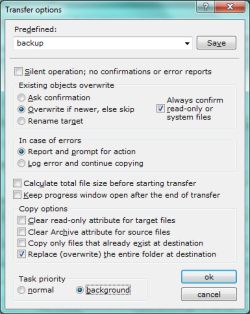
Windows explorer is notorious for leaving you in the cold whenever errors disrupt a large copy e.g. across the network. You are left wondering which files where copied and how to restore order.
xplorer² takes the worry off your file copies with a range of useful options. You can have many parallel background transfers or queue them sequentially. There are several overwrite policies (confirm/rename/check dates), size management, and optional clearing of the read-only attribute when copying from CDs.
You can pause and resume transfers, even leave them completely unattended: no questions will be asked and any unexpected events or errors will be logged. This is ideal for network administrators performing routine backup operations.
Likewise when you delete files with xplorer² you can skip any "files in use" errors and continue deleting the rest of your files.
Advanced file operations
xplorer² has many other extended file management commands, like file splitting/merging, a shredder, advanced NTFS awareness (hard and symbolic links, folder junctions, ADS, file comments) and much more. These commands are also available in scrap containers so you can apply them on arbitrary file collections or recursively on subfolders.At the same time it remains shell-friendly, seamlessly integrating with most namespace and other shell extensions. Exotic shell features like custom icon overlays (e.g. TortoiseSVN) are also supported.
Next: MAINTAINANCE »
Sample demo videos
 Click on a link to get a glimpse of xplorer² capabilities
- demo: robust transfer for daily backup; pause and resume file copy; overwrite control
- demo: copy files with filters, excluding temporary files
- demo: split and join large files (e.g. to send via email)
- demo: TSVN integration with icon overlays and repository status column
- demo: ease file backup tasks with folder junctions

