
|
xplorer²Exponential growth to file management productivity |

|
|
xplorer²Exponential growth to file management productivity |

xplorer² window presents the contents of one or more folders, and offers a palette of file management commands to work with the files you see. The figure below demonstrates all the window features — it may look complicated but you can turn off GUI elements you don't need using View menu.
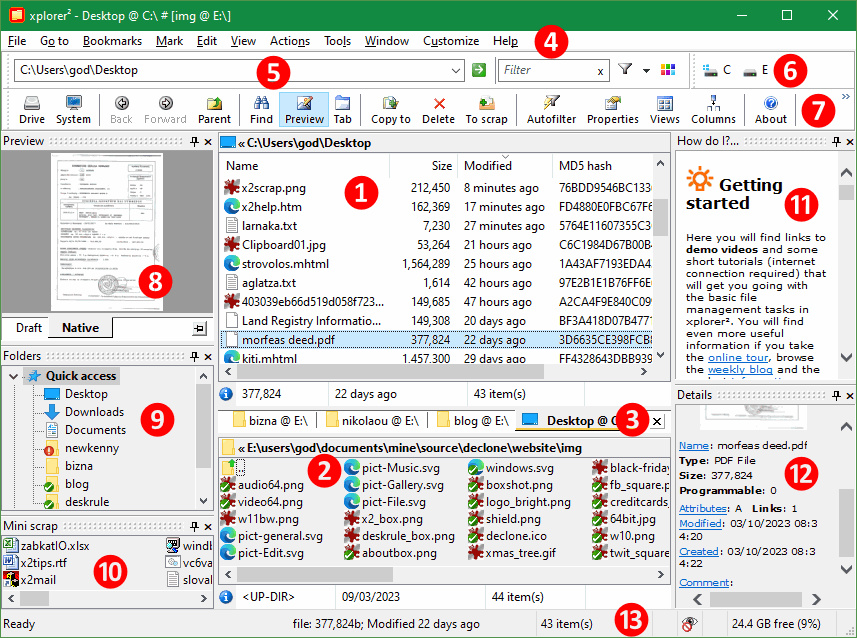
Here is a brief description of the main window elements, by their reference number in the red circle:
Each folder pane can host multiple folders in tabs (there are 4 shown in the figure). You open a new tab using File > New tab menu command. When first created, a tab inherits the active pane's properties (folder browsed and pane style), but from then on it is independent. You can change the style to something else and browse to different folders. The label of each tab shows the folder name (the full path is shown as a tooltip). Tabs let you switch between folders quickly, but note that only one can be active at a time. Click on a different tab to activate its folder. Use [x] button to the right of the tab strip to close the active tab.
 to access them). xplorer² addressbar isn't clickable but you can use each folder's titlebar pane for the equivalent functionality. Addressbar also accepts typed DOS and windows external commands to execute. Here you will also find the quick filter box where you can quickly filter, select and search for files in the active folder. Right click on any toolbar to turn the addressbar on/off using the context menu.
As with all windows programs, xplorer² can be resized or maximized to see more file contents. Within the window, the dual panes and all the peripheral panes like the tree can be resized using splitter bars. Place your mouse over the lines dividing the panes, and it should turn into a resizing cursor  ; then you can grab the splitter with your mouse and move it left/right (or up/down) to change the relative pane sizes.
As in windows explorer, with xplorer² you work with one folder at a time, which is the active tab of the active pane (either ① or ②). The active folder path is shown in the addressbar ⑤ and in the active pane's titlebar (the window titlebar is showing summary paths of both active and inactive panes). Use the folder tree, drivebar or type paths in the addressbar to browse a different folder.
| In the active folder pane you select one or more files with the mouse or the keyboard (or using a command from Mark menu) to operate on them, using a menu or toolbar command. Selected items show with a blue background color. In multi-selections, a single item is the focus, which is drawn with a dotted rectangle as in the pic to the right. It is usually the item you clicked on last. The focused item is special as it is the one that gets previewed in panel ⑧, whose details show in pane ⑫ and the statusbar. When only one item is selected, it is also the focus obviously. |

|
|
Many commands require a selection to work. If there's nothing selected then the command is disabled; the menu command or/and toolbar button appear ghosted to indicate the disabled state. Other commands are toggles, turning a feature on/off: when enabled a tick appears on the menu item — or the toolbar button appears depressed. On the right you can see examples of normal, disabled and ticked menu and toolbar states
Command availability also depends on the folder type being browsed; some commands are only available in regular (filesystem) folders and will be disabled if you are working in a special folder like ThisPC or Control Panel. |

|
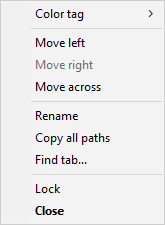
xplorer² uses context sensitive menus depending on where you right click on. It presents the commands that are relevant to the area you clicked. For example if you right click on a tab you see tab-related commands, if you right click on the list header you see commands related to columns and so on. Thus you don't need to search among the hundreds of main menu bar ④ available commands; always try a right click first.
xplorer² user interface is using standard windows OS components that are easy to automate with accessibility tools (NVDA/JAWS for visually impaired users).
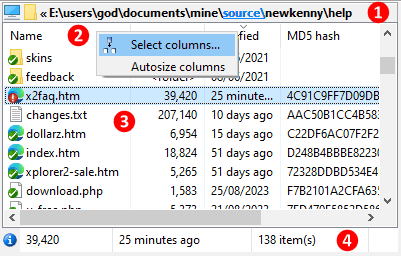
 icon pops a drive selection menu for all the local and external drive letters when clicked.

You manage files by clicking on them to select them, then use any toolbar or menu command. Right click on the selected files to show the standard shell context menu with windows explorer commands like copy, delete, rename etc. You can drag selected items with the mouse and drop them to other locations e.g. move them to different folders.
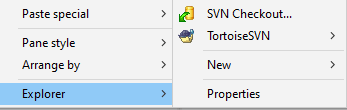
| Another standard shell item is the background menu. Find an empty spot (without any text information) and right click to see the menu. If you have difficulty showing the background menu — can't find where to click? — then right click on the folder icon on the pane's titlebar ①. In there you will find Explorer submenu with more shell related commands, e.g. create new word documents etc. To see extended commands press <SHIFT> key as you right click. |
|
|
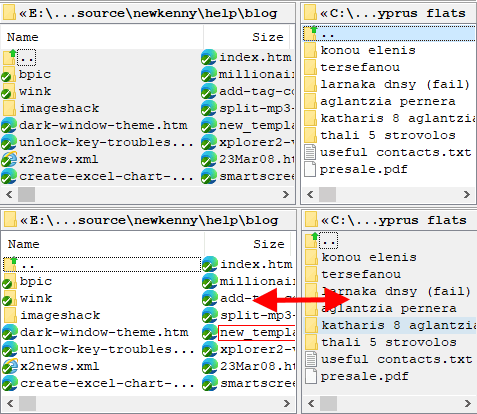
When you are not copying or comparing folders, you can turn off the dual pane mode with View > Dual pane menu command, giving you more room to work with folder contents. Use the same menu to turn dual panes back on. The main window figure above shows the dual panes stacked vertically, but you can also place them side by side with View > Tile horizontally menu. Drag the splitter (divider line) to make one pane bigger than the other; <CTRL+E> keyboard shortcut will make the panes equal size.
Only one pane is active at a time, the one with lighter background color (the left one in the picture to the right). All menu commands operate on the active pane. The right hand side pane is inactive, drawn with a darker background color. Press <TAB> key to make the other pane active — or click on it with the mouse. The background colors will swap, signalling the change of activation.
If you have trouble recognizing which pane is active, you can choose a darker color for the "inactive background" through settings. For extra visibility tick "Highlight active pane's titlebar..." option.
|
|
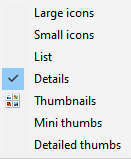
You can add more folders using File > New tab menu command. A freshly opened tab inherits the folder and view properties of the previously active tab, but from then on it is totally independent. You can browse different folders, change its style to thumbnails, or whatever you desire.
You probably have worked with tabs before (e.g. your internet browser) so you will know about the little tabs that represent each folder. Only one tab is active at a time; click on a different tab to bring up another folder (and simultaneously hide the previously active folder). You can add tabs for both the left and right (dual) panes, however only the 2 visible folder tabs are in business (one active, one inactive). You can open as many tabs as you like, but if you have too many of them, it may get confusing — use Window > Find tab menu command in such cases to find a particular folder by its (partial) name.
| Each tab shows the folder icon and its name. To see the full path, hover the mouse on a tab and a popup window will appear showing the path. The active tab is drawn with an orange highlight to tell it apart (if you cannot see this color use advanced options, "Folder tab highlight"). You can have tabs on top or to the bottom of the pane to suit your style. |

|
To close a tab you can double-click on it or press <CTRL+F4> keys. Use Window > Close all tabs menu command to close all tabs except for the active one. If you close a tab by accident, you can bring it back using Window > Reopen tab. You will find more tab related commands if you right click on a tab to see its context menu.
|
|
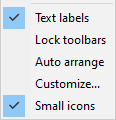
Let's start with the toolbars, including the addressbar. Toolbars can be rearranged with the mouse, if you drag them by their handle on the left edge, that looks like a dotted vertical line
 . You can put two or more toolbars in the same row, or split them into separate rows. Or right click on a toolbar and pick Auto arrange command from the context menu, if you don't mind the default widths. Other commands in the toolbar context menu:
|
|
All peripheral panes (tree, quickviewer etc) can be rearranged to taste if you grab them by their titlebar and move them around to another side of the xplorer² window (all 4 sides are available for docking). An outline rectangle indicates the new docking location. You can have more than one pane docked to the same side. Using splitter bars you can resize both the entire dock side width (or height for top/bottom docks) and the relative sizes of panes within each dock. For clarifications please watch the demo video
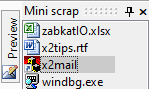
If you hold down <CTRL> key while dragging a panel it will stay floating (detached). This way you can make it bigger without affecting the usable area of xplorer² window. Another space saving idea, especially for panes you don't need visible all the time, is to have them minimized. Use the little pin  on a pane's titlebar to auto-hide it. It then turns into a button (see Preview vertical button in the image to the right). If you hover your mouse over such a button, the minimized pane appears, taking up the entire side of the window. Move the mouse away and the pane will again hide. This is best understood with the demo video . The little [x] to the right of the titlebar will permanently close a panel. All these actions (float/dock/etc) are also available from a titlebar's context menu. on a pane's titlebar to auto-hide it. It then turns into a button (see Preview vertical button in the image to the right). If you hover your mouse over such a button, the minimized pane appears, taking up the entire side of the window. Move the mouse away and the pane will again hide. This is best understood with the demo video . The little [x] to the right of the titlebar will permanently close a panel. All these actions (float/dock/etc) are also available from a titlebar's context menu.
|
|
Once you setup the panes to your liking, use View > Toolbars > Lock dock sites command to fix their position. Note when you resize the entire xplorer² window, the dock widths and heights are adjusted proportionately, to keep the same relative sizes.
|
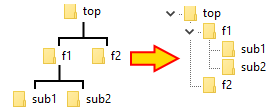
Filesystems are organized like a folder tree, one folder can have subfolders, and these in turn can have sub-sub folders, and so on to greater tree depths. Folders on the same level are called siblings, and their direct subfolders are their children. Windows represents tree hierarchies in a more compact fashion using indentation to represent levels. Sibling folders are at the same (left) indentation, and their children are indented further to the right, as you can see in the pic to the right. Dotted vertical lines help identifying the branch levels.
Most people are familiar with tree controls, where the little arrows in front of each folder node are used to expand and collapse a sub-branch. If you prefer the keyboard, use up/down arrows to select a folder, then use right and left arrow keys to expand and collapse a branch, respectively. |
|
 .
Beware, expanding top level branches will take a long time! If you use this command by mistake press <ESC> key a few times and the read will be aborted.
.
Beware, expanding top level branches will take a long time! If you use this command by mistake press <ESC> key a few times and the read will be aborted.
xplorer² folder tree can be turned on/off using View > Show tree menu command, or pressing <CTRL+T> keys. It contains the entire filesystem starting with the Desktop root node. Once you find your desired folder, expanding tree branches as necessary, click on it and its contents will be read in the active pane. The selected folder will appear with bold letter in the tree. If you are a keyboard person, use the arrow keys to locate your folder. With the default "single click to change folder" option the last folder selected will be activated (there's a small timeout). If you want to browse the tree without activating folders, either disable the single click mode, or hold down <ALT> key as you move around the tree nodes.
Except for choosing folders to browse, the tree can be set to follow the folder you browse in the active pane. This makes sense if you consider that you can switch to folders with all sorts of means in xplorer², not just with the tree. This behavior is enabled ticking "Keep synchronized with folder in active view pane" tree option. Then you can see the nearby siblings of the active folder. Without this setting, you can manually align the tree and folder pane using View > Locate in tree menu command.
By default xplorer² shows only a single tree that is shared among the dual folder panes. Some people prefer to have a separate tree for each pane, and this is yet another option called "Show 2 trees". In this setup, the tree(s) become part of the dual panes and cannot be moved around the docks.
|
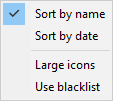
Each tree branch is arranged by Name, but it is also possible to sort sibling folders by date modified, using the background context menu, which displays when you right click on some empty space. With the same menu you can choose whether you want small or large folder icons (toggle). Finally you can turn the folder exclusion filter on/off with Use blacklist menu.
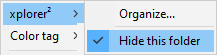
The entire tree namespace may include folders you never use, e.g. Libraries or some duplicate folders that appear in multiple locations. You can hide such unwanted folders by right clicking on them and then picking xplorer² > Hide this folder context menu command. Hiding a folder automatically enables the blacklist. If you want to see all the folders again (perhaps to un-blacklist some), pick Use blacklist from the background menu, to turn off the exclusion filter. |
|
|
Formerly blacklisted folders have Hide this folder menu ticked, just untick the menu item to cancel the blacklisting. This command appears in the customizable xplorer² submenu, that is added on top of the standard shell context menu for files and folders. Note that only top level folders can be blacklisted.
For more information watch this demo video
|
|
|
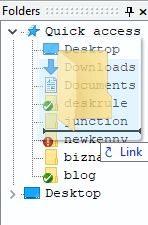
To begin with QAL is populated by your most frequently used folders, but you can add more folders with drag-drop
(make sure you watch the demo video). Select a single folder either from the tree or a regular pane, and drag it over the QAL tree section. Be careful to drop it inbetween existing folders (you will see a horizontal insertion mark and the drop action will be Link), otherwise you'll end up moving the new folder inside the one existing in the QAL! For safety you can drag-drop new folders using the right mouse button, so if something goes wrong you can cancel the drop. Using drag-drop you can also reorganize items in the QAL, e.g. move them up or down.
Folders in the QAL can be used as bookmarks for browsing, drop targets for copy operations etc. The QAL branch can do everything the "normal" tree nodes do. There are only two exceptions:
If you remove QAL folders only to find them present again when you restart xplorer², you must disable the feature that automatically adds the most frequently used folders in the QAL using advanced options (search for "Frequent items in tree")
|
|
If you don't need the QAL, untick "Show quick access list" tree option. Then only the desktop-rooted folder hierarchy will show. Also note that QAL is not available when you opt for 2 trees.

 . Such messages stay on for a few seconds and then they are dismissed automatically. Double click on the leftmost pane to repeat the last message (in case you didn't have enough time to see it); for extended error information use Help > Last error menu command.
 means there are 2 files selected and their total combined size is 1393455 bytes.
But the status bar usefulness doesn't stop here. If you browse the menu commands, you will see a brief explanation of what each command does on the statusbar! This also applies when you hover your mouse pointer over a toolbar button. It is a mini instruction manual. Often while xplorer² is busy executing one of your commands, a progress bar shows on the statusbar, giving you an idea how much more is left to be done.
Not bad for a little bottom line, isn't it? If nevertheless you don't want any of the above, you can disable the statusbar altogether using View > Toolbars > Status bar menu command. If you disable the statusbar, all error messages will show as message boxes.

The ribbon has 3 command tabs (item ② in the above figure). The basic Home tab contains the most frequently used commands, whereas other tabs offer more detailed control for advanced features. The leftmost File tab is a traditional drop-down menu where you can exit the program, get help, and get back the original menu if you don't like the ribbon!
The command buttons in each tab are split in categories (see ① Browse, Clipboard, etc), or logical groups. Many ribbon buttons are split into a main command like Paste and a drop-down portion that shows variations of the main command (e.g. Paste link). You can get information on what each button does if you hover the mouse over it.
The ribbon offers limited customization support. You can right click on a button you use frequently and put it on the Quick Access Toolbar ③, the little toolbar the ribbon puts on the window titlebar. You can put up there all the commands you need then right click on the ribbon to minimize it, and reclaim the space it uses.
|
Most of the commands in the full menu system appear in the ribbon, albeit at different, more intuitive locations.
This is a basic choice you have to make early, because if you learn the ribbon version of the commands it will be hard to revert to the menu bar interface (and vice versa).
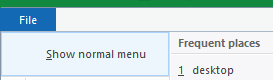
If you want to get the menu bar back, you can remove the ribbon using Show normal menu command under the leftmost File ribbon tab. Or if you just want to use an advanced command that's not available in the ribbon, use the command finder, the little question mark button  on the quick access toolbar.
|
|
Your everyday interaction with xplorer² is to browse one or more folders, then click on files to manage them this way or the other. xplorer² helps you get to your folders quickly, and ultimately find the files you are after, with pin-point accuracy. Then use menus and toolbars to work with your files. Most of the time you work in one folder at a time, as your filesystem is organized in your drives. Using scrap windows you can work with items from many folders simultaneously — e.g. modify files in a folder and all its subfolders.
Working with the mouse is easy, but for increased productivity xplorer² is keyboard friendly. Almost everything can be done with the keyboard. Lots of commands have keyboard shortcuts; if you are used to different accelerator keys, you can remap keys to your taste. You will find reminders of keyboard shortcuts in menus
 and toolbar infotips
 so you know that pressing <CTRL+F> is a quicker way to access the file search command!
To move around the various panes, there are many keyboard shortcuts that involve the <TAB> key, e.g. <SHIFT+TAB> jumps to the addressbar. There are more useful hidden keyboard shortcuts in the appendix
so you know that pressing <CTRL+F> is a quicker way to access the file search command!
To move around the various panes, there are many keyboard shortcuts that involve the <TAB> key, e.g. <SHIFT+TAB> jumps to the addressbar. There are more useful hidden keyboard shortcuts in the appendix
Here are some concepts to keep in mind for your everyday file management:
Most menu commands will open a dialog box that lets you setup the file operation to taste. All these dialogs are described in detail in this documentation. All of them include an OK button you use to start the command procedure, and CANCEL which you click to abort the operation before it even begins — in case you picked the wrong menu by accident. Some dialogs are resizable, look out for the sizing handle  at the lower right corner.
To help you focus on the active dialog, xplorer² shades (darkens) its main window till you finish setting up the dialog's parameters. If you find this behaviour distracting tick the advanced option "Disable main window alpha shading..."
at the lower right corner.
To help you focus on the active dialog, xplorer² shades (darkens) its main window till you finish setting up the dialog's parameters. If you find this behaviour distracting tick the advanced option "Disable main window alpha shading..."
When xplorer² is really busy working on your commands, especially if the job is big and hard, then you need to wait a while (a wait cursor  will show). Most lengthy operations show a progress dialog that lets you see how much is left to be done, as well as buttons to pause or cancel the job altogether, as such:

Some less intensive jobs may show a progressbar on the statusbar instead, which again gives you an idea how much work is left to be done. To cancel such commands press <ESC> key (if it doesn't respond immediately, try keeping ESCape pressed down for a few seconds).
During file operations, it may happen that folder contents get changed, files added or deleted or modified. xplorer² senses such changes automatically and refreshes the active folder pane so it stays up to date. This feature is working most of the time but if you find that xplorer² didn't pick up all the changes use View > Refresh menu command to force a re-read of the contents. Working inside a constantly modified folder (e.g. Downloads folder during an active file download) may waste too many resources, so you should consider suspending the autorefresh feature using View > Hold autorefresh menu item.
|
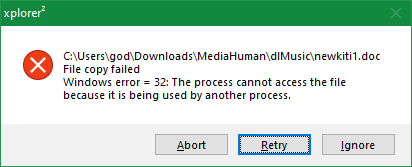
During file operations, problems are possible for a variety of reasons and causes. In case of errors, xplorer² will pause what it's doing and alert you to the problem. Some errors can be ignored or skipped, but it depends on the command being executed, the folder type and so on. Some errors are terminal, so xplorer² will abort the operation and issue a warning message on the status bar (you will hear the dreaded ding sound as well).
In general errors are caused by inadequate permissions, e.g. you are trying to copy into a folder that belongs to another user. Sometimes you can work around UAC restrictions launching an elevated xplorer² process via Window > Administrator menu command. However it is not recommended to run in administrator mode all the time. You can tell when xplorer² is running elevated by the * showing after the program name in the window titlebar. Window > Administrator command is then disabled. See the troubleshooting section for some common problems and workarounds. |
|
xplorer² is well tested and stable, so it shouldn't crash or hang very often. There are thousands of active users so real problems get reported and fixed quickly. However you cannot expect taxes and program death <g> so crashes are possible, especially if you use buggy shell extensions. If you find a reproducible bug please report it using Help > Crash information menu command. See the appendix for the kind of information required to troubleshoot crashes and hangs.
Under normal circumstances, xplorer² automatically saves its settings on exit, which means next time you run it, it should look exactly like last time you used it (window size and position, folder tabs, the lot). If you want to start xplorer² at fixed locations, use command line arguments to specify fixed folder paths for the left and right panes.
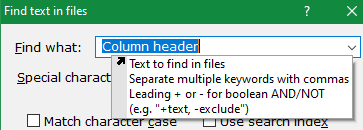
To access this history, either click on the drop-down arrow button of the combo-box, or start typing and xplorer² will find all the matching items from the history and present them to you as such:
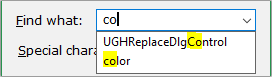
Notice that the partial string you type is matched both at the beginning or the middle of history strings. Once you see the item you need to repeat, press <Down> arrow a few times to select it, then <ENTER> key to close the autocompletion popup. Press <ESC> key to close the popup without selecting anything.

|
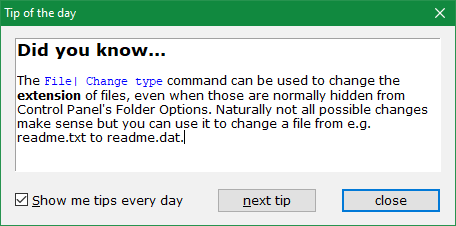
Use Help > Tip of the day to see bitesize, helpful tips and tricks every time you start xplorer². The tips window is modeless, meaning you can read the tip and try it out at the same time. When you had enough of these tips, untick "Show me tips every day" checkbox — but leave them on for a while, you will be surprised by what there's to learn!
All the tips are available in a single file called X2TIPS.RTF in xplorer² installation folder, if you prefer to search in them, print them out etc.
Further reading
◪ The most useful xplorer² tips and tricks for better everyday file management |
|
From our experience with customer support, some commands tend to confuse users. In such cases xplorer² shows a 1-off clarifying message. If you don't want to see that message again, tick Don't show this message again and you won't be bothered with it again.
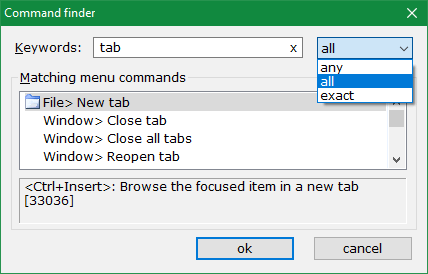
The command search algorithm uses menu text and the brief explanation messages that appear on the statusbar describing each command — so you don't need to remember the menu name, you can search for what the command does, too. Use the Keywords input box for your search keywords; any matching menu commands will be listed in the results box. Note searches are case insensitive, so you can use capitals or lowercase keywords. If your query returned too many results or no results, try changing your search keywords.
If you are using a translation of xplorer² GUI, you must use the same language for search keywords. You search for commands as they appear in the menu bar — but you don't need to worry about accented letters: rôle is the same as role.
The search results box lists all commands that match your query, one command per line. The full "menu path" is presented e.g. File > New tab means open File from the menu bar and use New tab command from File menu. Some commands may have 3 or more segments if they are in submenus (the > character separates submenus). However you don't need to remember the whereabouts of the menu, just double click on a command in the results pane and you immediately execute the command — just as if you used the menu! If you prefer the keyboard, select the command row and press <ENTER> key to execute it.
|

|
 instead of the folder icon. Use Lock menu again to unlock a tab. For more information here's a